PayPay
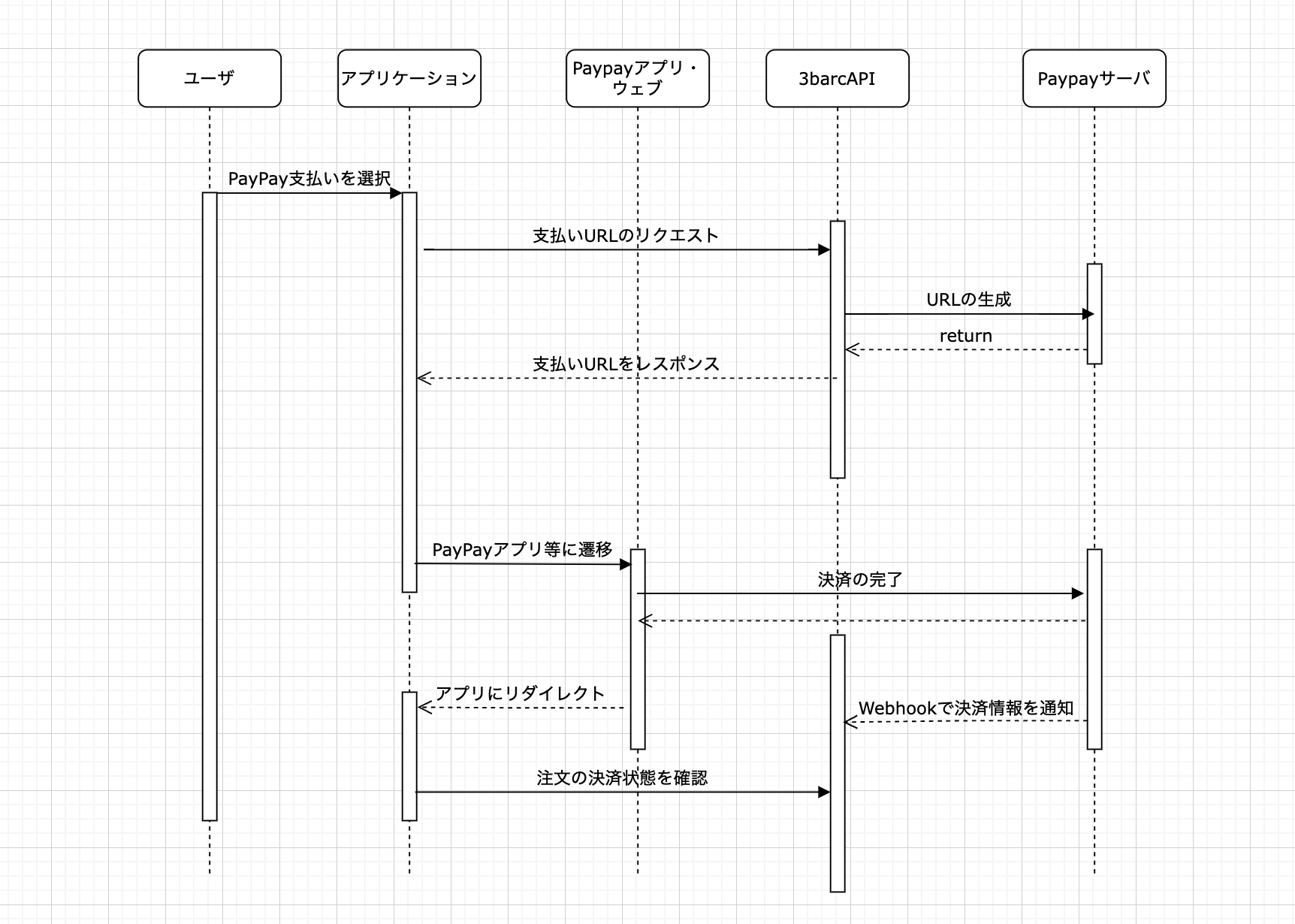
手順
- URL のリクエスト
- PayPay への遷移
- 注文結果リクエスト
URL のリクエスト
PayPay の支払いを行うための URL を発行します。
RequestBody
| パラメータ名 | 型 | 詳細 |
|---|---|---|
| order_id | string | ガチャの注文コード |
| type | string | "paypay"固定 |
| redirect_type | string | アプリに遷移させたい場合は"APP_DEEP_LINK" web にリンクさせたい場合は"WEB_LINK" |
| redirect_url | string | PayPay での決済完了後に遷移する URL |
PayPay への遷移
支払い URL に遷移します。
注文の状態確認
注文の状態は決済後に非同期で状態を更新します。 [/API-reference/orders/show](GET Order)
支払いイメージ
例
curl -X 'POST' \
  'http://localhost:3000/api/v1/orders/e613eb41-4263-4381-b37c-74691934d671/payments/' \
  -H 'accept: application/json' \
  -H 'Authorization: Bearer {jwt}' \
  -H 'Content-Type: application/json' \
  -d '{
  "type": "paypay",
  "redirect_type": "APP_DEEP_LINK",
  "redirect_url": "https://doc.3barc.space",
}'
ResponseBody
| パラメータ名 | 型 | 詳細 |
|---|---|---|
| order_id | string | ガチャの注文コード |
| url | string | PayPayWeb の支払い画面に遷移させる URL |
| deeplink | string | PayPay アプリに遷移させる場合の Deeplink |
| redirect_url | string | PayPay での決済完了後に遷移する URL |
| expiry_at | datetime | 支払い有効期限 |
{
  "order_id": "631d26f3-80bd-45e9-b529-8dcf54a67073",
  "url": "https://qr-stg.sandbox.paypay.ne.jp/28180104Fhl7vlUnFbIWqqJP",
  "deeplink": "paypay://payment?link_key=https%3A%2F%2Fqr-stg.sandbox.paypay.ne.jp%2F28180104Fhl7vlUnFbIWqqJP",
  "redirect_url": "https://devapi.3barc.space",
  "requested_at": "2022-05-09T10:45:27.000Z",
  "expiry_at": "2022-05-09T10:50:27.000Z"
}